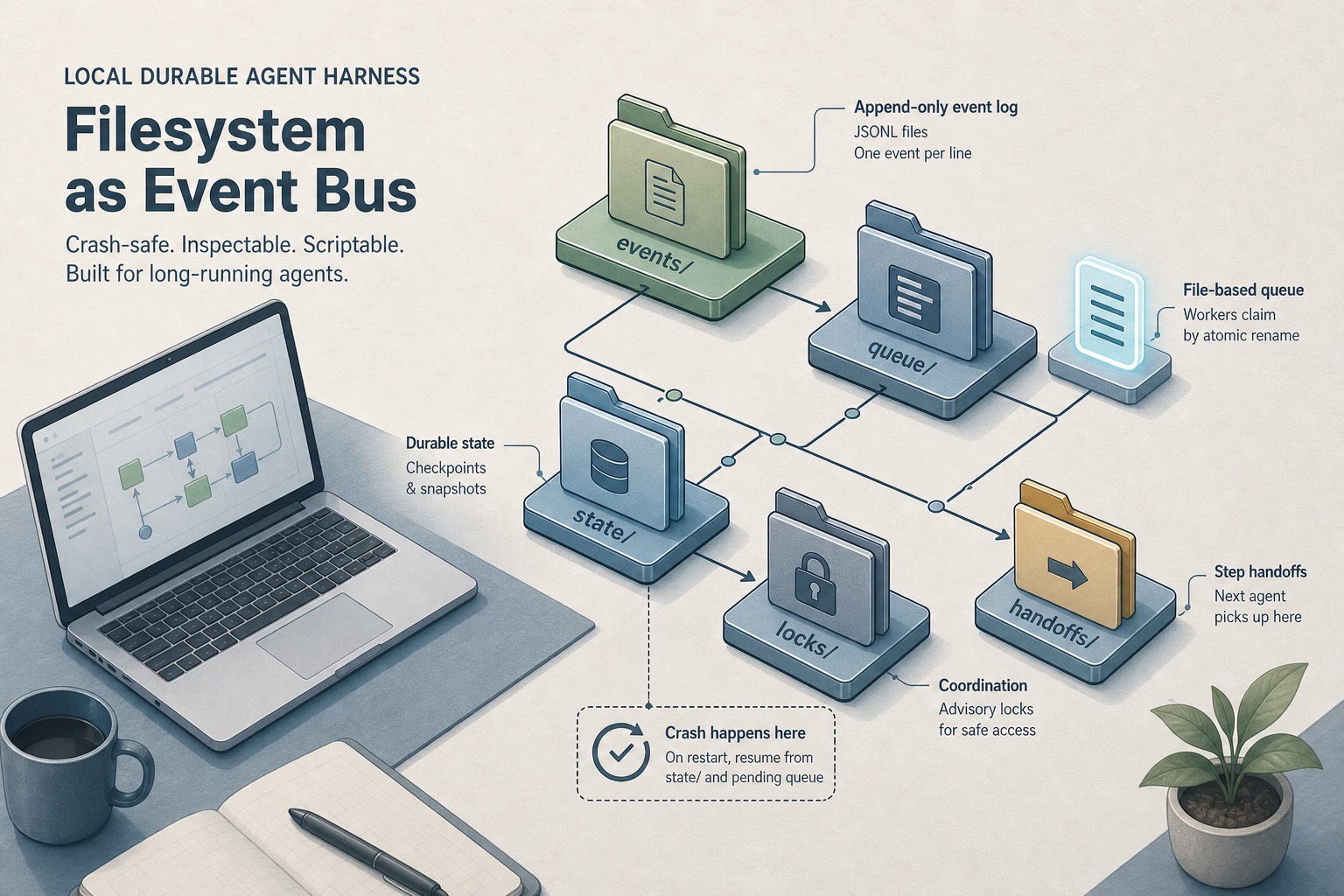
Keep Agent Work Alive After a Crash
Long AI jobs should not vanish when a laptop sleeps or a tab crashes. File-backed progress lets restarts resume and risk drop. Teams skip a cloud workflow bill when durability alone is the goal.
A long AI job starts. The tab crashes. The laptop sleeps. The process dies. Whatever lived only in chat, or only in memory, is gone. Teams do not need a multi-region workflow platform. They need work that survives the crash and can pick up where it left off.
This is the fourth post in the harness series. It builds on roles that do not collide, checks that can fail, and looping until the outcome is met. The missing layer is simple: progress on disk, not in the conversation.
Architecture Summary
| Component | Role |
|---|---|
| Status files | Record phase, finished slices, and mid-flight work. |
| Queue folder | Holds next slices; one claim at a time. |
| Run history | Append-only log of evidence, not rewrites on failure. |
| Gate | Contract checks must pass before close. |
| Wake trigger | Folder watch, poll, or sentinel resumes the loop after restart. |
What "durable" means here
Fragile: The plan, status, and next step live in a chat window or a running process. Kill either one and recovery from memory is expensive and error-prone.
Durable (local): The same facts live as ordinary files: a status note, a queue of next steps, a run log, a checklist before done. Restart the machine. Open the folder. The loop can continue.
That covers three concerns. Reliability means work is not lost. Risk drops when half-finished work cannot ship after the session ends. Cost stays lower when teams restart one failed slice, not the whole project. Teams do not pay a cloud orchestrator just to remember where they were.
How it fits the series
| Earlier lesson | What files add |
|---|---|
| Planner / builder / checker | Written handoffs and one active editor. Still true; the queue enforces one claim at a time |
| Validation contract | A gate script or checklist must pass before anyone accepts done |
| Loop until the goal | Status on disk shows the current phase; a wake (new file, timer, or folder watch) starts the next slice |
Roles and contracts keep people and agents honest. Loops keep going until the outcome holds. Files make that loop wakeable overnight without babysitting the chat.
The business shape (no API tour)
A run folder works like a paper job ticket:
- A goal and phase: what done means, and whether the run is planning, building, checking, or blocked.
- A queue: next slices waiting; one claim at a time so two workers do not edit the same thing.
- A history: append-only notes of what ran (evidence), not a rewrite of the past when something fails.
- A gate: before close, the contract checks must pass with proof in the handoff.
The model still does the thinking. The files decide what runs next and what counts as finished. Chat is a window, not the filing cabinet.
Wake the next step by watching a folder, polling every few minutes, or dropping a small continue sentinel. Same idea as the loop post, just durable across restarts.
Crash resume, in plain terms
On start or after a kill:
- Read the status files: what phase, what is already finished, what is mid-flight.
- Skip completed slices.
- Re-run only the in-progress slice, or compensate if it left a mess.
- Do not treat chat history as the source of truth.
The kill test that matters: restart mid-step and confirm continuation from the last completed step, not from the transcript. If resume lies, the rest of the harness is theater.
Cost: what is free vs what still is not
Usually $0 for orchestration SaaS: a log and queue on disk, a lock for one worker claim, and a simple gate before done.
Still costs money or time: model tokens or electricity for a local model, and human attention when the run is blocked on a decision.
Do not sell free agents forever. The real win is narrower: durability without renting a managed workflow on day one. Graduate to a hosted orchestrator when multi-region reliability, team dashboards, or ops are needed, and pay then.
Vendors sell model toolkits, durable step runners, and file-shaped agent products. Steal the ideas (checkpoint, resume, files as source of truth). Their brand names are not required to get the business outcome on a laptop.
When files are enough, and when to graduate
Stay on files when the team is solo or small. Jobs run on one machine overnight. Crash-resume and a paper trail are the main gap.
Graduate when multi-region durability, shared team observability, or managed queues are needed. Heavy tooling is fine; the idea stays the same: state outside the chat, proof before close.
Skip the whole setup for a typo fix or a throwaway spike. Use it when the work spans hours or days and losing the thread would hurt.
Closing
A file-event harness makes the series crash-safe. Roles own the next ticket. Contracts are the gate. Loops run as a state machine on disk. Handoffs carry evidence in a folder. One shippable slice at a time. Wake, claim, step, check, record, then sleep without fearing a dead tab.
Start with a status file, a queue folder, and one gate that can fail. Tokens still cost. Forgetting progress should not.
Related: Stop One AI Agent From Owning the Whole Job · Writing a Validation Contract That Actually Catches Bugs · Keep Working Until the Outcome Is Met